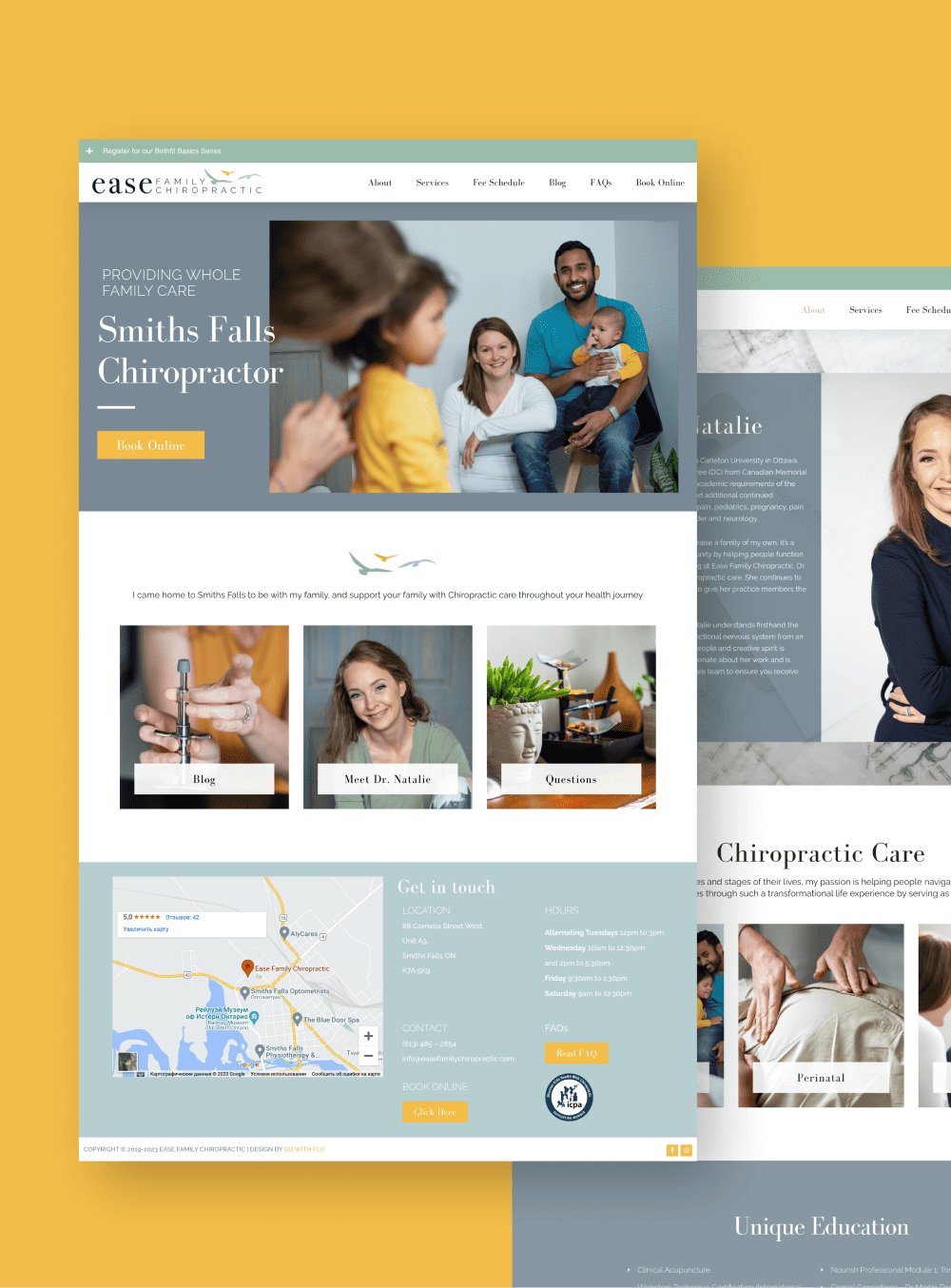
When you’re busy seeing patients, the idea of planning a new healthcare website can feel like one more big project on your plate.
You might know you need a better online presence for your practice, but not know where to start, which tools to choose, or how to stay compliant and safe.
In this guide, we’ll walk through the key pieces you need to think about first, so your website for your practice works smoothly, supports your patients, and fits the way you already run your day-to-day.
If you’d like help mapping all of this out, that’s exactly what we support clients with through our web design & development services and ongoing tech support. You can also get to know me and my approach on the about page.
Before building a healthcare website, you need a clear strategy, the right platform, basic HIPAA awareness, local SEO, and tools for booking and forms. Planning these pieces upfront helps your site stay compliant, attract patients, and reduce admin work.
1. Start With Strategy, Not Just “Looks”
Most healthcare professionals start by thinking about colours, photos, and layout.
Those things matter, but without a simple strategy behind your healthcare website, it’s easy to end up with something that looks nice but doesn’t actually support your practice.
Let’s start with two core questions.
Who do you want to reach?
Different audiences need different things from a clinic website.
Before you write a word of copy or choose a platform, get clear on who you most want to bring in and support.
For example, you might be:
- A therapist focusing on couples or trauma work
- A dietitian working with chronic illness or prenatal nutrition
- A small medical practice serving families in a specific neighbourhood
- A specialist working mostly by referral from other providers
Each of these groups searches differently, asks different questions, and has different concerns.
When we work with clients at GoWithFlo, we look at your ideal patients, the services you offer, and how people currently find you, then build your healthcare website around that.
What do you want your site to do?
A good medical practice website does more than “look professional.”
It acts as the central, reliable hub for your patients and your team.
Start by deciding what you want your healthcare website to handle, such as:
- Basic information: services, locations, insurance details, FAQs
- Online booking or intake requests
- Secure patient forms or portal links
- Educational blog posts or resources
- Referral information for other healthcare professionals
Once you’re clear on this, it becomes much easier to pick a platform, plan your pages, and connect the right tools behind the scenes.
Instead of guessing, you’re designing your practice’s online hub with a clear purpose.
2. Choose the Right Platform for Your Healthcare Website
The platform you choose is the foundation of your healthcare website.
Each option has trade-offs in flexibility, cost, ease of use, and how well it integrates with the tools you already use, like your booking system or electronic health record (EHR).
WordPress for Healthcare Professionals
WordPress is one of the most flexible options for a medical practice website.
It’s open-source, which means you fully own your site and can extend it with plugins for booking, forms, SEO, and more.
WordPress works well when you:
- Need custom layouts or more complex features
- Plan to publish regular content, like blogs or patient resources
- Want strong control over security and performance
- Use tools that integrate easily with WordPress, and most do
However, WordPress does need regular care, updates, backups, and security checks.
That’s why we offer WordPress maintenance for busy healthcare professionals and small clinics, so your site stays secure and stable without becoming another task on your list.
If you’ve wondered whether WordPress for healthcare professionals is “too technical,” the truth is it can be very manageable when it’s set up well and supported over time.
Squarespace and Showit
Squarespace and Showit are hosted platforms, the company manages the hosting for you, and you get drag-and-drop design tools.
They tend to be simpler to manage day-to-day than WordPress and work well for clean, modern designs for smaller practices.
These platforms suit you if you:
- Want to manage simple edits yourself without touching code
- Have a fairly straightforward site with basic booking links or forms
- Don’t need highly custom integrations or complex features
We often build on Squarespace or Showit for solo practitioners who want a patient-friendly website that’s easy to keep updated.
Wix and Webflow
Wix is easy to get started with, but can feel limiting later if you want more control over performance or integrations.
Webflow, on the other hand, gives more design freedom and technical precision, great for clinics that want a very custom look and are comfortable working with a developer longer term.
The best choice depends on your flexibility needs, the tools you use now, and how much ongoing support you want.
When we help clients choose, we look at your entire tech stack, booking, CRM, email, EHR, so your healthcare website fits into your real workflows, instead of working against them.
If you’d rather skip the platform research and build something that’s already thought through, that’s exactly what we do at GoWithFlo. Explore our web design services →
3. Understand Compliance, Privacy & Security
Healthcare brings extra responsibility around privacy and security.
You don’t need to be a legal expert, but you do need a basic understanding of how your healthcare website can handle patient information safely.
What a HIPAA Compliant Website Actually Means
HIPAA (the Health Insurance Portability and Accountability Act) is a US law that protects sensitive patient information, known as PHI (Protected Health Information).
A HIPAA compliant website is one that handles any PHI in line with HIPAA rules, for example, through secure forms, encrypted storage, and signed agreements with any third-party tools that process that data.
Key points to understand:
- If you collect health details, diagnoses, or treatment information through your site, you may need HIPAA-compliant tools
- Standard email and basic contact forms are often not enough for PHI unless set up through a HIPAA-compliant service
- Some booking, forms, and messaging tools offer HIPAA-compliant plans with Business Associate Agreements (BAAs)
The official HHS HIPAA guidance is the place to confirm requirements based on your situation.
When we build or review a HIPAA compliant website, we look closely at your forms, intake process, and any tools that collect PHI, then help you choose safer options. We also support this through our CRM setup & optimization services, connecting your website to secure, appropriate tools for your clinic.
There’s a common myth that your entire medical practice website needs to be a locked-down portal. In reality, many healthcare professionals use a public-facing website for education and booking, and direct patients into a separate secure portal for anything sensitive, giving you a patient-friendly website that is still mindful of privacy.
Basic Security Every Healthcare Website Needs
Even if you’re not storing PHI directly on your site, you still need strong basic security to protect patient trust and keep things running smoothly.
At minimum, your clinic website should have:
- SSL (Secure Sockets Layer), the “https” padlock in the browser that encrypts data between your site and visitors
- Strong, unique passwords and two-factor authentication for site logins
- Regular software updates, especially if you use WordPress
- Daily or weekly off-site backups
- Spam and malware protection on forms and login pages
If you use WordPress, the official WordPress security guide is a helpful overview of best practices.
Our WordPress maintenance services handle updates, backups, and security monitoring, so your practice isn’t relying on “I’ll get to it later.”
4. Make It Easy for Patients to Find and Use Your Site
A strong healthcare website is both findable and usable.
That means patients can discover your medical practice website through search, and then easily get what they need once they arrive.
Local SEO for Healthcare
Most small practices rely on local patients, and that’s where local SEO for healthcare comes in.
These are practical steps that make it easier for people in your area to find your practice in Google search and on Google Maps.
Key pieces of local SEO for healthcare include:
- Setting up and fully completing your Google Business Profile (address, hours, services, photos)
- Using your location and specialty naturally throughout your site, for example, “family doctor in Ottawa” or “therapist in Toronto”
- Keeping your name, address, and phone number consistent across your site and online directories
- Encouraging genuine reviews from patients, where ethically and legally appropriate
Your healthcare website can also use structured data (schema) to give search engines more context about your business type, hours, and location.
Done well, local SEO for healthcare helps your practice show up clearly for the people nearest to you. You can browse our client portfolio to see how other service-based businesses and healthcare professionals present their online presence.
Simple, Patient-Friendly Navigation
Being findable is only half the story.
You also want a patient-friendly website that feels calm, clear, and easy to move through, especially for people who may already feel stressed or unwell.
A straightforward clinic website structure might include:
- Home
- About / Meet the Team
- Services
- New Patients / How It Works
- Resources or Blog
- Contact / Book an Appointment
Each page should answer one main question at a time.
Clear headings, short paragraphs, and easy-to-spot buttons reduce confusion for every visitor. We also keep accessibility in mind, readable fonts, sufficient contrast, and plain language, so your healthcare website works well for a wide range of patients.
5. Plan Your Booking, Forms & Tech Integrations
The right tools behind your healthcare website can save your team hours every week.
Instead of endless back-and-forth emails and phone calls, your site can handle basic admin so you can focus on care.
Choosing a Booking System for Healthcare
Your booking setup depends on how your practice operates.
When choosing a booking system for healthcare, consider:
- Whether it offers HIPAA-compliant plans, if you’re handling PHI
- How it integrates with your EHR or existing calendar
- How easy it is for patients to use on mobile
- How much control you have over appointment types, reminders, and cancellations
In many cases, we embed a booking link, a request form, or a portal login directly into your medical practice website, so patients experience one calm, connected journey instead of navigating three separate tools.
CRM and Workflow Integrations
A CRM (Client Relationship Management system) helps you track and manage people who contact your practice, from first inquiry through ongoing care or referrals.
For healthcare professionals, it can also support waitlists, newsletters, and referral partners.
We help clients connect their website to the right systems using our CRM setup & optimisation services, so that:
- New enquiries land in a clear, organised list instead of getting lost in your inbox
- Follow-ups and reminders are more consistent
- You can see at a glance where patients or clients are in your process
Sometimes that also means bringing in our virtual assistant & tech support services to help manage the ongoing pieces, updating content, adjusting forms, or sending out newsletters.
The goal is simple: your healthcare website should talk to your other tools, so your workflows feel smoother, not more complicated.
6. Think Beyond Launch: Updates, Content & Ongoing Support
Launch day feels significant, but it’s not the finish line.
The most effective healthcare websites grow and shift with your practice, rather than staying frozen for years at a time.
There are three areas we encourage clients to plan for from the start.
Regular content and updates. Even small changes make a difference, updated hours, a new service, or adjusted fees. If you publish articles or resources, you also signal to search engines and patients that your clinic website is actively cared for.
Technical upkeep. If your site runs on WordPress, that means ongoing updates, backups, and security checks. Our WordPress maintenance packages handle this for you, so nothing breaks quietly in the background while you’re seeing patients.
Support as your practice evolves. Maybe you add a new provider, shift to a different booking tool, or open a second location. When you have a trusted tech and web partner, adjustments like these feel much lighter.
At GoWithFlo, we see your healthcare website as a living part of your practice, and we’re here to review what’s working, tidy what’s not, and support new ideas as you grow.
FAQs About Building a Healthcare Website
Do I need a HIPAA compliant website if I only use a contact form?
It depends on what you collect through that form. If you ask for detailed health information, diagnoses, or treatment history, you may need a HIPAA-compliant form tool and clear processes in place. If you only collect basic contact details to follow up by phone, the risk is lower, but you should still use secure tools and clear privacy disclaimers. When in doubt, speak with a legal or compliance expert familiar with your type of practice.
Is WordPress a good choice for healthcare professionals?
WordPress can be an excellent choice for healthcare professionals when it’s set up and maintained well. It gives you strong control over design, integrations, and content for your medical practice website. However, it does need regular updates and security checks, which is why many practices opt for managed support like our WordPress maintenance services.
What should I put on the homepage of my medical practice website?
Your homepage should give a clear, calm overview of who you help, what you offer, and how to take the next step. We suggest including a short introduction, your main services, your location, a brief “who we are,” and a simple call to action, like “Book an appointment” or “Call the clinic.” It should also link easily to your New Patients page, contact details, and any key resources.
How do I get my healthcare website to show up on Google Maps?
To appear on Google Maps, you need a complete and verified Google Business Profile. Make sure your address, phone number, hours, and website match what’s on your site. Add photos, your services or specialties, and keep everything up to date. Consistent local SEO for healthcare, including matching information across directories, also helps your listing show more reliably in local results.
How often should I update my healthcare website?
At a minimum, review your healthcare website every few months for accuracy, checking hours, services, providers, and fee details. Technical updates, especially on WordPress, should happen more frequently, usually monthly. If you share resources or blog posts, a simple schedule of once a month can steadily build trust and search visibility over time.
Bringing Your Healthcare Website to Life
Your healthcare website doesn’t need to be complicated to be effective.
When you start with a clear strategy, choose the right platform, respect patient privacy, and connect your tools thoughtfully, your site can become a calm, reliable part of your practice for you, your team, and your patients.
If you’d like a thought partner for this process, we’re here for that.
We can help you map out your needs, choose the right tech, and build a site that fits your real workflows through our web design services. When you’re ready to explore what this could look like for your practice, get in touch here, and we’ll take it one step at a time together.